


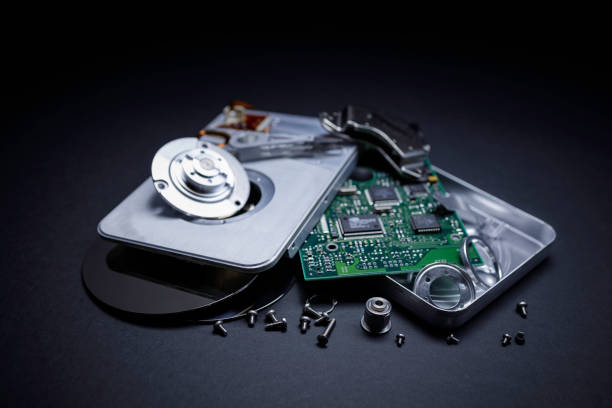
Quick Answer: Yes, in most cases. Data recovery from hard drive failure works by accessing the physical platters or flash chips directly, separate from whatever caused the drive to stop functioning normally. Even drives with clicking sounds, corrupted file systems, or failed controller boards can often be recovered, though success rates and cost depend heavily on how the drive failed and what happens in the hours right after.
The moment a drive stops showing up on your computer, panic sets in fast, especially if the last backup was months ago. Here’s the good news nobody tells you in that moment: the data almost never actually vanishes the instant a drive fails. It’s usually still sitting there physically. The challenge is accessing it.
Why Hard Drives Fail In The First Place
Traditional hard disk drives store data magnetically on spinning platters, read by an arm with a tiny head that hovers microns above the surface. That mechanical complexity is exactly why HDDs fail more often than solid state drives, which have no moving parts. A head crash, where the read arm makes physical contact with the platter, is one of the most serious failure types and the source of that dreaded clicking sound.
Solid state drives fail differently. Instead of mechanical wear, SSDs rely on NAND flash memory cells that degrade with write cycles over time, and they can also suffer controller chip failures that make a perfectly intact drive suddenly unreadable. Samsung, Western Digital, and Seagate all publish rated endurance limits for their drives, but real world failure often comes earlier, triggered by power surges or manufacturing defects rather than simple wear.
Let me show you what I mean: a drive that “just stopped working” with no clicking, no smell, and no visible damage is often a logical failure, not physical. The platters or chips are fine. It’s the file system, partition table, or firmware that’s corrupted.
Logical Failure Versus Physical Failure
Logical failures cover corrupted file systems, accidental deletion, formatting mistakes, and firmware glitches. None of these physically damage the storage medium, which means recovery software can often read the raw data directly and rebuild a file structure around it. This is the category most home users can attempt themselves with the right tools, though a botched attempt can sometimes make a professional recovery harder afterward.
Physical failures are a different animal entirely. Clicking or grinding sounds mean mechanical damage inside the drive, and every additional power-on attempt risks scraping more data off the platter surface. Water damage, fire damage, and drives that won’t spin up at all also fall into this category, and these require a cleanroom environment where technicians can open the drive without introducing dust particles that would destroy the platters on contact.
What To Do (And Not Do) The Moment A Drive Fails
Power it off immediately if you hear clicking, grinding, or any unusual sound. Continuing to power cycle a mechanically failing drive is the single most common way people turn a recoverable situation into an unrecoverable one.
Don’t run disk repair utilities like CHKDSK on a drive you suspect has physical damage. These tools write to the disk as part of their repair process, and on a drive with underlying issues, that write activity can overwrite the very data you’re trying to save.
Don’t attempt DIY platter swaps you saw in an online video. Hard drives are assembled and calibrated in true cleanroom conditions during manufacturing, with air filtered to remove particles far smaller than what’s visible to the naked eye. Opening a drive on a kitchen table introduces contamination that can cause permanent, unrecoverable damage within seconds of the platters spinning.
What Professional Recovery Actually Involves
A proper data recovery from hard drive failure starts with diagnosis: is this logical or physical, and if physical, what specifically failed. For mechanical issues, technicians work in a cleanroom, sometimes swapping in matched donor parts, like a read head assembly from an identical drive model, since even small manufacturing variances between drive units can prevent parts from working across different serial batches.
Once the drive is stable enough to read, the process shifts to imaging: creating a sector by sector copy of the drive onto a healthy destination disk before attempting any file recovery. This step matters because it means all further recovery work happens on the image, not the original failing drive, protecting against further degradation during the recovery process itself.
From there, file system reconstruction and file carving techniques rebuild the folder structure and recover individual files, even in cases where the partition table itself was destroyed. Recovery specialists typically provide a file list for review before final delivery, so you know what’s recoverable before paying for the full recovery.
Setting Realistic Expectations
Recovery success rates are genuinely high for most failure types, but not universal. Severe physical damage, like platters scored from a prolonged head crash, or drives that suffered fire damage with warped internal components, sometimes result in partial rather than complete recovery. Solid state drives with certain controller failures can also be harder to recover from than mechanical drives, since data is often encrypted or scrambled across memory chips in ways specific to that controller’s firmware.
The honest answer from any experienced recovery shop should include a realistic percentage estimate after diagnosis, not a blanket promise of full recovery before anyone has actually looked at the drive.
The Bottom Line
A dead drive feels final, but the data underneath is usually more resilient than the symptoms suggest. The biggest risk to permanent data loss often isn’t the initial failure. It’s what happens in the hours after, when well meaning troubleshooting turns a recoverable drive into one that isn’t.
Frequently Asked Questions
Q: Can data be recovered from a hard drive that won’t turn on?
A: Often yes, especially if the issue is a failed controller board or power circuit rather than damage to the platters themselves. A diagnosis is needed to know for sure.
Q: Is data recovery software safe to use on a clicking hard drive?
A: No. Software recovery requires a functioning drive to read from, and a clicking drive should be powered off immediately and handled by a professional in a cleanroom setting.
Q: How long does professional data recovery take?
A: Straightforward logical recoveries can take a day or two, while physical recoveries involving cleanroom work and part swaps often take longer, depending on drive condition and part availability.
Q: Can formatted or deleted files be recovered?
A: Yes, in most cases, since formatting and deletion typically remove the reference to a file rather than the file’s actual data on the disk, at least until that space gets overwritten.
Q: Is SSD data recovery different from hard drive recovery?
A: Yes. SSDs have no moving parts, so recovery focuses on controller chips and NAND flash memory rather than mechanical components like platters and read heads.
